
Whiteout Survival Bot on the cloud — auto farm & daily tasks 24/7, no PC
Survive the frost, automated from A to Z.
The WOS bot runs on our servers instead of your PC. It grows your city, gathers, hunts beasts, joins rallies, trains heroes and finishes daily tasks around the clock — with 5 presets you can apply in one click.
- Accounts running
- 8,900+
- Average uptime
- 99.8%
- Actions / hour
- 1,500
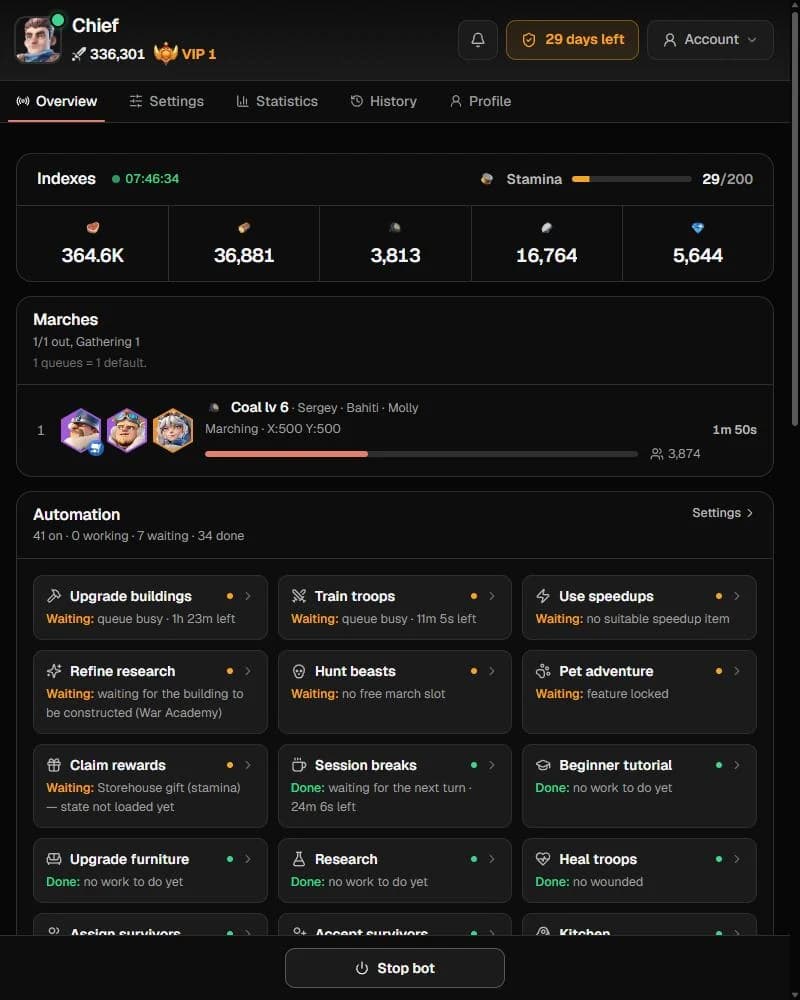
A real dashboard, in real time
Control every module, watch the log stream and track resources from any browser or phone.
Resources, marches and every running module at a glance.
Whiteout Survival bot features
Five automation pillars, built from the modules players actually run every day.
Auto gather
Sends every free queue out to gather, claims idle exploration rewards and opens resource chests so your stockpile never stalls.
Auto farm & daily tasks
Beasts, heroes, experts, pets, chief gear, arena, exploration stages, mail and every free gift — the daily checklist done for you.
Auto rally
Auto-joins alliance rallies, runs intel missions and raises a shield when your city is attacked.
Multi-account & presets
Run several characters from one dashboard. Five presets — City growth, Resource farm, Combat, Save for events, Light idle — preview exactly what changes before applying.
Anti-ban safeguards
Reaction delay, session breaks, run-time limits, schedules and auto re-login keep the bot's rhythm human-like and reduce detection risk.
All 51+ automation modules
Turn each module on or off from the dashboard — globally or per account.
Operation
- Presets
- Timer
- Run schedule
- Run-time limit
- Auto re-login
- Reaction delay
- Session breaks
- Multi-account
- Priority order
City
- Beginner tutorial
- Upgrade buildings
- Upgrade furnishings
- Research
- Train troops
- Heal wounded
- Assign survivors
- Recruit survivors
- Kitchen
- Repair city wall
- Building rewards
- Use speedups
- Open resource chests
- Unlock features
- Refinement research
Map
- Queue allocation
- Hunt beasts
- Gather resources
- Auto-join rallies
- Shield when attacked
- Intel missions
- Idle exploration
- Pet adventure
Heroes
- Hero development
- Free recruit
- Expert training
- Chief gear
- Pet training
Alliance
- Auto join alliance
- Alliance help
- Request help
- Donate alliance tech
- Alliance chests
Rewards
- Claim gifts
- New character rewards
- Enact laws
- Free gifts
- Event free gifts
- Exploration stages
- Arena
Shops
- Alliance shop
System requirements & 3-step setup
Up and running in 5 minutes
What you need
- A Whiteout Survival account on any state
- Any device with a modern browser — Windows, macOS, Android or iOS
- A Discord account for your license and support
- No emulator, no gaming PC, nothing left running at home
- 1
Step 1
Join Discord & register
Register your dashboard account through our Discord bot with the command below.
/register email:[email protected] - 2
Step 2
Activate your license & link your account
Activate your Whiteout Survival key, then add your game account in the dashboard.
/license activate key:BGC-XXXX-XXXX-XXXX - 3
Step 3
Apply a preset & press Start
Pick City growth, Resource farm, Combat, Save for events or Light idle — or set modules yourself — and press Start.
Stuck somewhere? Our team answers on Discord.
Join DiscordWhiteout Survival bot on a cloud server vs on your PC
Why running the bot on our servers beats keeping an emulator open at home.
CPU & RAM on your device
BotGame Cloud server0% — everything runs on our servers
Your PC + emulatorHeavy: an emulator often needs 4 GB+ RAM per account
Uptime
BotGame Cloud server24/7 with automatic re-login
Your PC + emulatorStops when the PC sleeps, crashes or loses internet
Electricity & hardware wear
BotGame Cloud serverNone on your side
Your PC + emulatorPC running day and night
Setup time
BotGame Cloud server3 steps, about 5 minutes
Your PC + emulatorInstall emulator, game, bot, then tune settings
Multiple accounts
BotGame Cloud serverSeveral accounts in one dashboard
Your PC + emulatorOne emulator instance per account
Game updates
BotGame Cloud serverBot updated for you within hours
Your PC + emulatorUpdate emulator, game and bot yourself
Control from your phone
BotGame Cloud serverAny browser, anywhere
Your PC + emulatorOnly at that PC or via remote desktop
Whiteout Survival bot FAQ
Is the Whiteout Survival bot safe to use?
No automation tool is risk-free, and we won't pretend otherwise. The bot uses reaction delays, session breaks, run-time limits and schedules to keep a human-like rhythm, and it is updated quickly after game patches.
Do I need a PC to run the Whiteout Survival bot?
No. Unlike a WOS bot for PC, ours runs on our cloud servers. There is no emulator and nothing to keep on at home; you control it from any browser, including your phone.
Does the bot do daily tasks automatically?
Yes. It claims gifts, mail, free and event gifts, runs the arena and exploration stages, trains heroes and experts, and handles survivors and the kitchen in your city.
What are presets?
Ready-made setting bundles: City growth, Resource farm, Combat, Save for events and Light idle. You see exactly which settings will change before applying, and everything else stays as you saved it.
Can I run several WOS accounts?
Yes — the number depends on your license, with one shared config or per-character settings. Ask on Discord for the option that fits you.
Where do I get support?
On our Discord. Open a ticket for setup help, or ask the community — the team is active every day.
Join the Bot Game Cloud community
Get release notes first, grab exclusive presets and talk directly with the dev team on Discord.
Join Discord15,000+ members on Discord