
Rise of Kingdoms Bot on the cloud — farm gems 24/7 with 0% CPU
Rule your kingdom — even while you sleep.
The ROK bot runs on our servers, not your PC. It gathers gems and resources, hunts barbarians, joins rallies, helps your alliance and clears daily rewards around the clock — controlled from any browser.
- Accounts running
- 12,400+
- Average uptime
- 99.9%
- Actions / hour
- 1,800
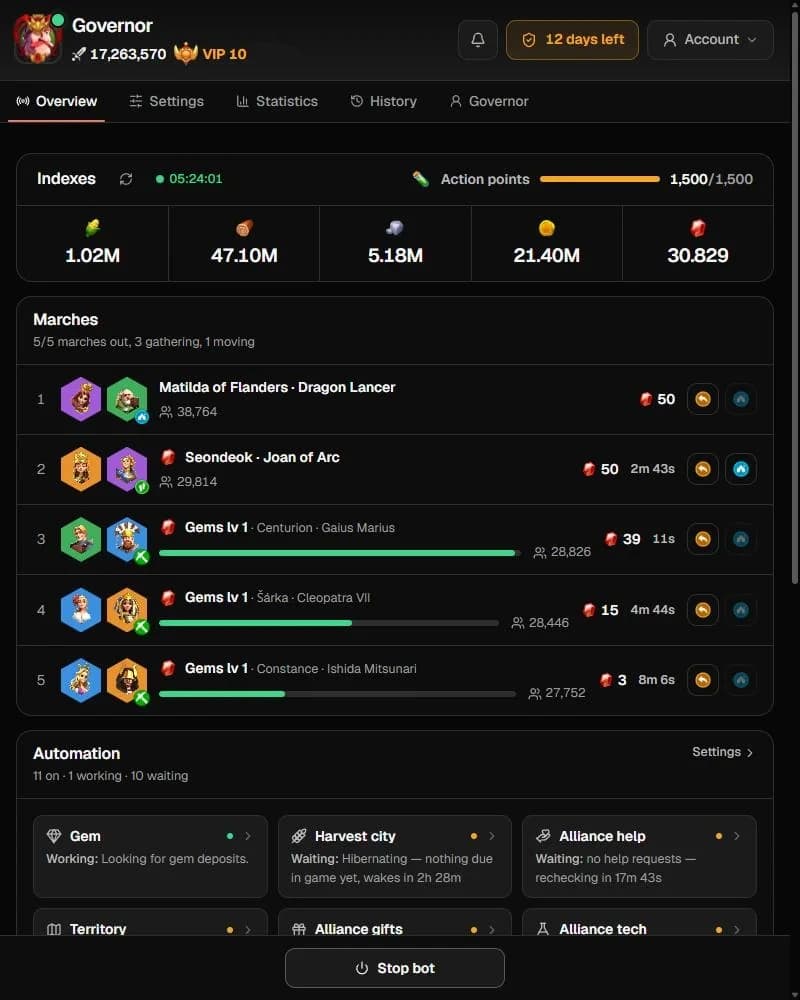
A real dashboard, in real time
Control every module, watch the log stream and track resources from any browser or phone.
Resources, marches and every running module at a glance.
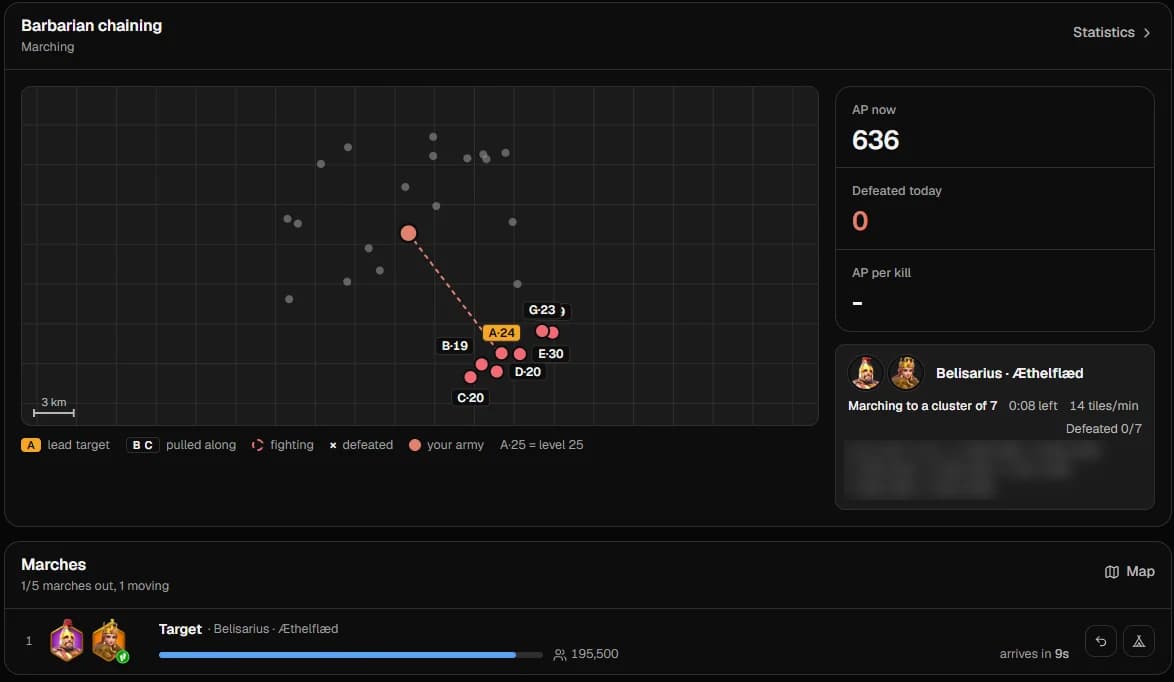
Barbarian chaining
Instead of walking to one barbarian at a time, the bot pulls a whole cluster behind a lead target and clears it in a single march — less travel, more kills for every AP you spend.
- A lead target pulls the rest of the cluster into one chain
- One march clears the whole chain, then moves on to the next cluster
- Live map with barbarian levels, pulled targets and fight status
- AP left, kills today and AP per kill, tracked automatically
Rise of Kingdoms bot features
Five automation pillars, built from the modules players actually run every day.
Auto gather gems & resources
A dedicated gem loop finds gem deposits and keeps free marches busy, while resource gathering and city harvest keep food, wood, stone and gold flowing.
Auto farm
Barbarians, marauders, fog, caves and villages, plus daily quests, VIP chests, mail, the Tavern and the Mysterious Merchant — all cleared automatically.
Auto rally
Joins alliance rallies and rallies barbarian forts on its own. Queue allocation decides how many marches go to rallies versus gathering.
Multi-account sync
Run several governors from one dashboard with one shared configuration, or override settings per account.
Anti-ban safeguards
Session breaks, run-time limits, schedules and auto re-login make the bot play in human-like sessions instead of nonstop, reducing detection risk.
All 37+ automation modules
Turn each module on or off from the dashboard — globally or per account.
Operation
- Timer
- Run schedule
- Run-time limit
- Auto re-login
- Session breaks
- Multi-account
- Priority order
Map
- Queue allocation
- Gem gathering
- Resource gathering
- Barbarians
- Barbarian chaining
- Marauders
- Barbarian fort rally
- Join rallies
- Explore fog
- Explore caves
- Visit villages
City
- Beginner tutorial
- Barbarian rift
- Upgrade buildings
- Harvest city
- Train troops
- Heal troops
- Produce materials
- Auto shield
Alliance
- Alliance help
- Territory
- Alliance gifts
- Alliance technology
Rewards
- Daily quests
- Daily VIP
- Collect mail
- Lucerne scrolls
- Crystals
Shops
- Tavern
- Mysterious Merchant
System requirements & 3-step setup
Up and running in 5 minutes
What you need
- A Rise of Kingdoms account on any kingdom
- Any device with a modern browser — Windows, macOS, Android or iOS
- A Discord account for your license and support
- No emulator, no GPU, no PC left running
- 1
Step 1
Join Discord & register
Join the official Discord and run this command in #bot-command to get your dashboard login.
/register email:[email protected] - 2
Step 2
Activate your license & link your account
Activate your key, then add your Rise of Kingdoms account in the dashboard. Credentials are encrypted with AES-256.
/license activate key:BGC-XXXX-XXXX-XXXX - 3
Step 3
Pick modules & press Start
Turn on gem gathering, rallies, alliance help or anything else, then press Start. The bot runs 24/7 on our servers.
Stuck somewhere? Our team answers on Discord.
Join DiscordRise of Kingdoms bot on a cloud server vs on your PC
Why running the bot on our servers beats keeping an emulator open at home.
CPU & RAM on your device
BotGame Cloud server0% — everything runs on our servers
Your PC + emulatorHeavy: an emulator often needs 4 GB+ RAM per account
Uptime
BotGame Cloud server24/7 with automatic re-login
Your PC + emulatorStops when the PC sleeps, crashes or loses internet
Electricity & hardware wear
BotGame Cloud serverNone on your side
Your PC + emulatorPC running day and night
Setup time
BotGame Cloud server3 steps, about 5 minutes
Your PC + emulatorInstall emulator, game, bot, then tune settings
Multiple accounts
BotGame Cloud serverSeveral accounts in one dashboard
Your PC + emulatorOne emulator instance per account
Game updates
BotGame Cloud serverBot updated for you within hours
Your PC + emulatorUpdate emulator, game and bot yourself
Control from your phone
BotGame Cloud serverAny browser, anywhere
Your PC + emulatorOnly at that PC or via remote desktop
Rise of Kingdoms bot FAQ
Is the Rise of Kingdoms bot safe? Can my account get banned?
Any third-party automation carries some risk, and no honest provider can promise zero. We reduce it with human-like timing, session breaks, run-time limits and schedules, and we update the bot quickly after each game patch. We never ask for payment details inside the game.
Do I need an emulator or a powerful PC to run the ROK bot?
No. The bot runs entirely on our cloud servers, so your device uses 0% CPU. You only need a browser to open the dashboard — even a phone works.
Can the bot gather gems automatically?
Yes. Gem gathering is its own module: it searches for gem deposits, sends free marches and repeats until you stop it, alongside normal resource gathering.
How many ROK accounts can I run?
Several — the number depends on your license. All of them are managed from the same dashboard; ask on Discord for the option that fits you.
What happens when Rise of Kingdoms updates?
We update the bot on our servers, usually within hours. Nothing to download — check the Server Status page for live progress.
How do I get help?
Open a ticket in our Discord. The team answers setup questions, reviews your settings and posts guides in the community channels.
Join the Bot Game Cloud community
Get release notes first, grab exclusive presets and talk directly with the dev team on Discord.
Join Discord15,000+ members on Discord